One of the best tools for Options Traders is @iChartsIndia

9
things Icharts can do, you'll wish you knew yesterday:

Collaborated with @niki_poojary

🧵

By the end of this thread, you'll learn 7 features with uses:

1. Option Chain (Advanced) features
2. Total PE - CE OI
3. Options Intraday OI Breakup
4. Cumulative OI change
5. Backtesting historical Data
6. Data in different intervals
7. Straddle/Strangle Charts

Let's go ↓
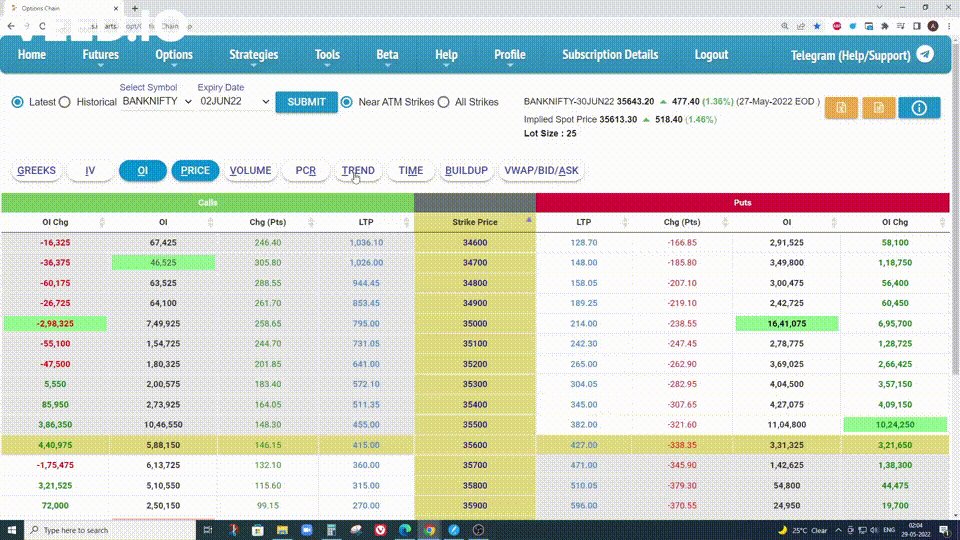
1. Option Chain (Advanced):

Uses:

• Understand the options chain better
• Know the correct market direction and
• Sell the right options with a higher probability of success.

Open Option Chain on Icharts and then click on:

• Trend
• Buildup
• Vwap

Like this:
2. Total PE - CE OI

Most popular and powerful feature, even used by experts like @nitinmurarkasmc heavily.

Observe the intraday Change in OI difference and align your trades with where writing is happening.

Can check it only for nearer strikes, or all strikes.

Here's how:
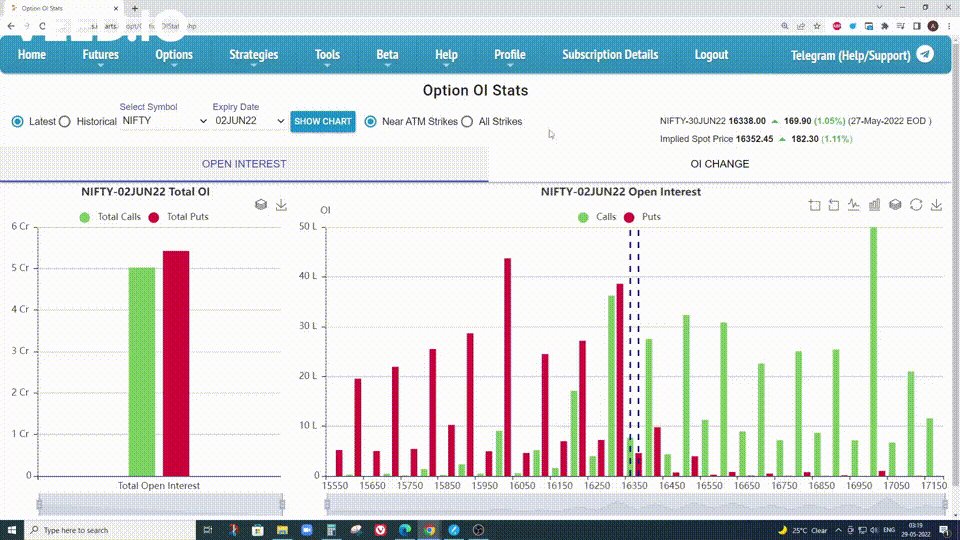
3. Option OI stats

Shows you Total OI and Change in OI in bar chart format.

Can segregate from Near Atm strikes to all strikes.

Historical Data of past expiries is also available to make backtesting easier.
4. Options snapshot

Option Chain with charts and Price and Open Interest showing in them.

Can look where open interest changes are happening.

Know quickly about multiple strikes Oi behaviors.
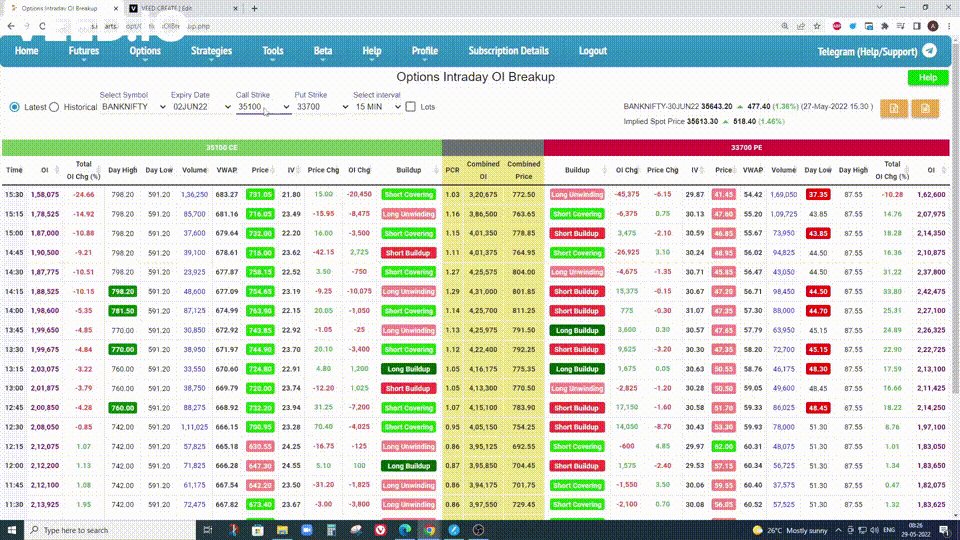
5. Options Intraday OI Breakup

Can see the individual data of any strike at any interval you want as per your liking.

I have seen a few scalper traders recommending this to their followers.
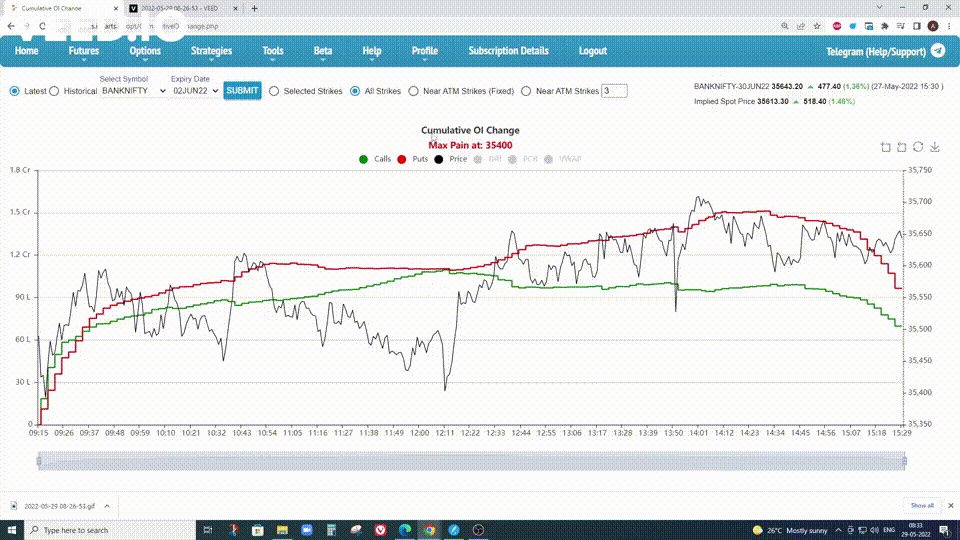
6. Cumulative OI change

Compare the total Open interest of the whole option chain amongst Calls and Puts.

Can also see this only for the near ATM strikes.

Can check historical data as well.
7. Backtesting historical Data

The most powerful feature of Icharts is the ability to backtest historical options data with ease.

Nearly all features have this feature enabled in them.

For eg, on Gap days can see how premiums behaved on the gap side and be prepared next time.
8. Data in different time intervals

Another awesome feature of Icharts is the ability to see any data in any time interval as we see fit.

For eg 3 mins, 5 mins, 10 mins, 15 mins, etc all can be seen separately.
9. Strangle/Straddle Charts

Most of the people started using Icharts as they were offering strangle/straddle charts.

This is particularly useful for traders wanting to sell straddles when they are decaying (falling in premiums).

Same for strangles.
If you enjoy such threads, here's the one I wrote yesterday:
https://t.co/fKzZvWTTb1
Icharts keeps coming out with new features constantly.

Keep an eye out for all these cool new features.

You'll find relevant information on these updates on these twitter handles.

Follow them for Ichart updates:
@iamswingtrader & @iChartsIndia
@iamswingtrader from @iChartsIndia and his team have done a great job in providing a one-place solution for data readers and data lovers.

If you have any questions for them feel free to reach out to them and if you do like the service they are providing you can take the same!
That's a wrap!

If you enjoyed this thread:

1. Follow us @Adityatodmal & @niki_poojary for more threads on Price action, Option Selling & Trading growth.

We've got you covered.

2. RT the first Tweet to share it with your audience.

I appreciate it!

More from Aditya Todmal

TradingView isn't just charts

It's much more powerful than you think

9 things TradingView can do, you'll wish you knew yesterday: 🧵

Collaborated with @niki_poojary

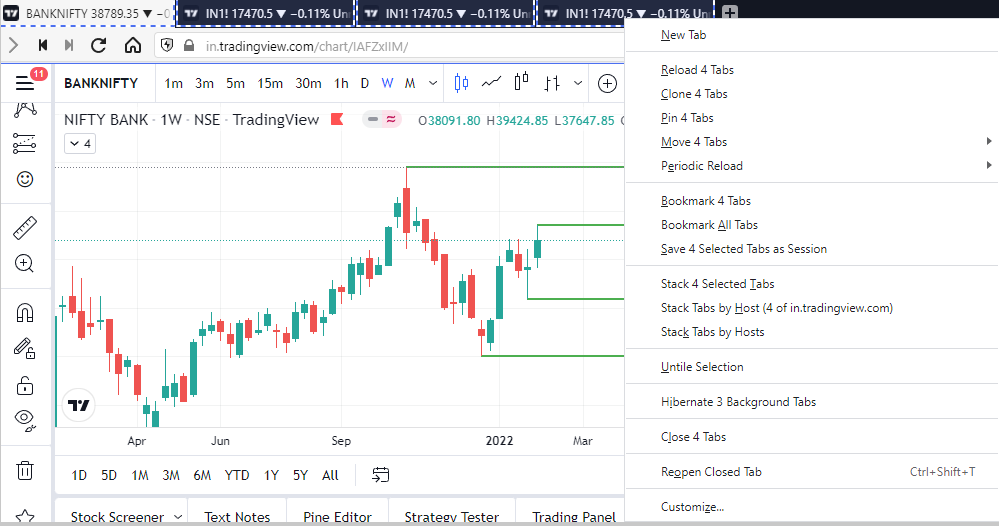
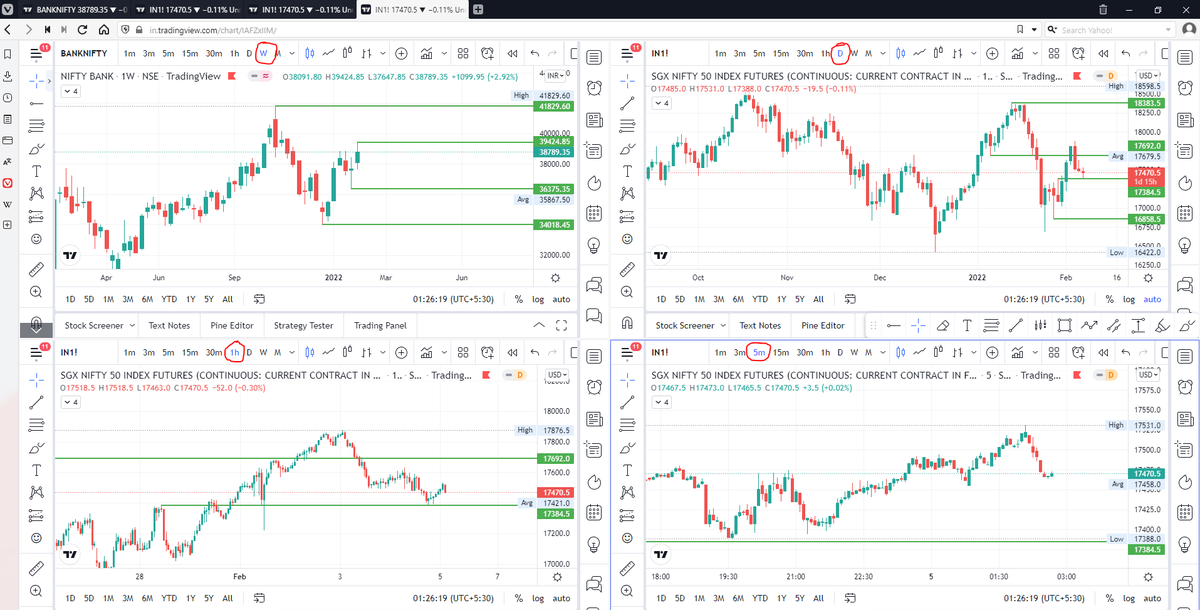
1/ Free Multi Timeframe Analysis

Step 1. Download Vivaldi Browser

Step 2. Login to trading view

Step 3. Open bank nifty chart in 4 separate windows

Step 4. Click on the first tab and shift + click by mouse on the last tab.

Step 5. Select "Tile all 4 tabs"


What happens is you get 4 charts joint on one screen.

Refer to the attached picture.

The best part about this is this is absolutely free to do.

Also, do note:

I do not have the paid version of trading view.


2/ Free Multiple Watchlists

Go through this informative thread where @sarosijghosh teaches you how to create multiple free watchlists in the free


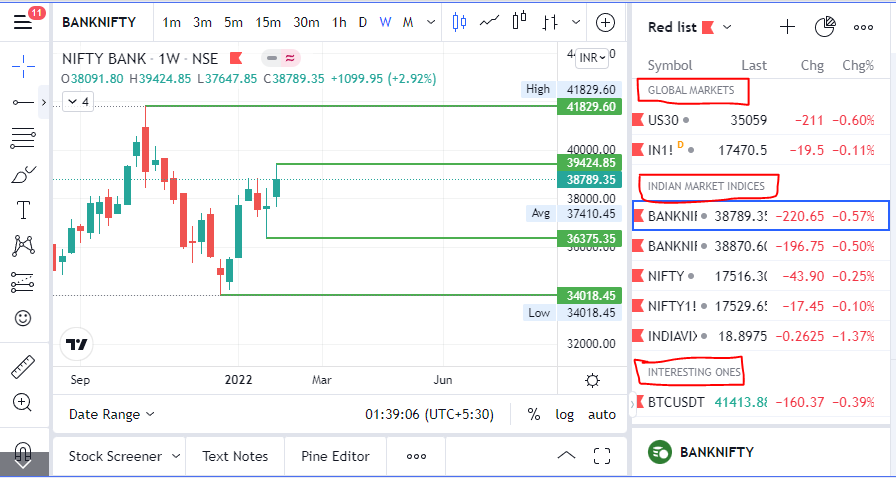
3/ Free Segregation into different headers/sectors

You can create multiple sections sector-wise for free.

1. Long tap on any index/stock and click on "Add section above."
2. Secgregate the stocks/indices based on where they belong.

Kinda like how I did in the picture below.
A THREAD ON @SarangSood

Decoded his way of analysis/logics for everyone to easily understand.

Have covered:
1. Analysis of volatility, how to foresee/signs.
2. Workbook
3. When to sell options
4. Diff category of days
5. How movement of option prices tell us what will happen

1. Keeps following volatility super closely.

Makes 7-8 different strategies to give him a sense of what's going on.

Whichever gives highest profit he trades in.


2. Theta falls when market moves.
Falls where market is headed towards not on our original position.


3. If you're an options seller then sell only when volatility is dropping, there is a high probability of you making the right trade and getting profit as a result

He believes in a market operator, if market mover sells volatility Sarang Sir joins him.


4. Theta decay vs Fall in vega

Sell when Vega is falling rather than for theta decay. You won't be trapped and higher probability of making profit.
Compilation of the best learnings from @BankniftyA through his tweets.

Have compiled his:

1. Expiry day trading.
2. Trade logics.
3. Multiple Charts analysis.
3. BTST criteria for stocks.

Share if you find it helpful so that everyone can benefit.

A pdf of his moneycontrol article where you can read about his journey and how he trades.


Advice on how to not let your mood influence your decisions.


Expiry day Trading:

How to become better?

When I had spoken to him on phone he advised me to backtest all expiries and rigorously practice them again and again to develop conviction. Superb advice!


Acts based on support and resistance levels from charts

More from All

How can we use language supervision to learn better visual representations for robotics?

Introducing Voltron: Language-Driven Representation Learning for Robotics!

Paper: https://t.co/gIsRPtSjKz
Models: https://t.co/NOB3cpATYG
Evaluation: https://t.co/aOzQu95J8z

🧵👇(1 / 12)


Videos of humans performing everyday tasks (Something-Something-v2, Ego4D) offer a rich and diverse resource for learning representations for robotic manipulation.

Yet, an underused part of these datasets are the rich, natural language annotations accompanying each video. (2/12)

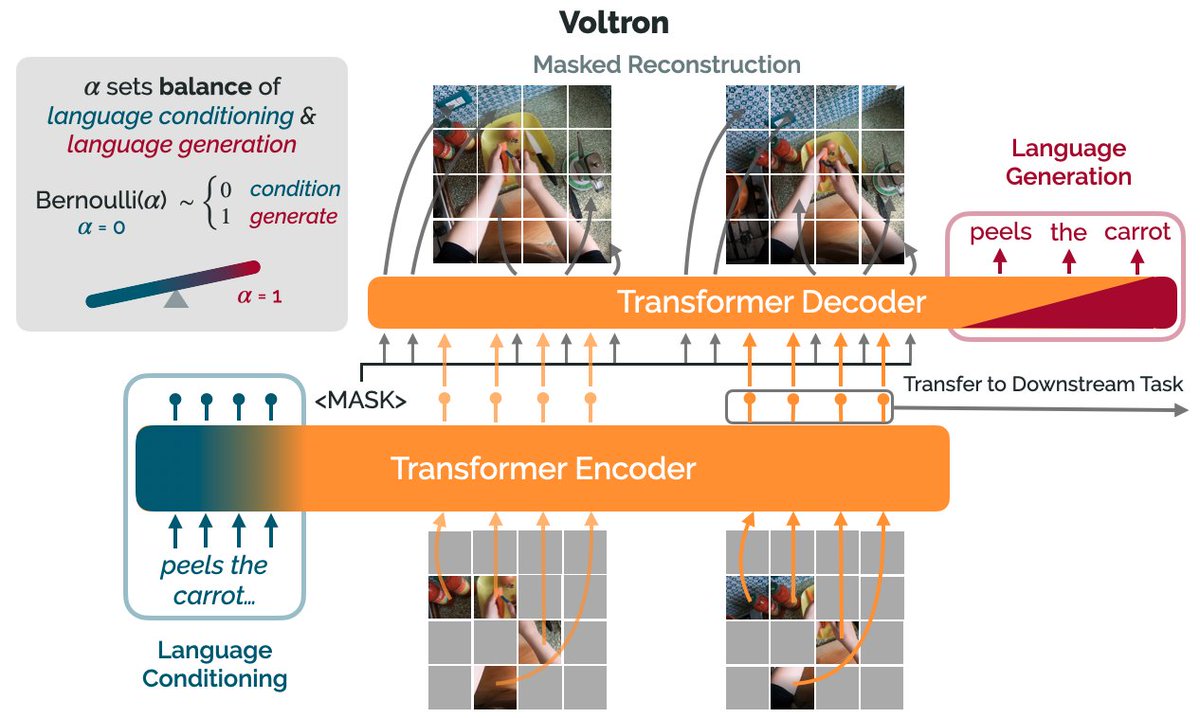
The Voltron framework offers a simple way to use language supervision to shape representation learning, building off of prior work in representations for robotics like MVP (
https://t.co/Pb0mk9hb4i) and R3M (https://t.co/o2Fkc3fP0e).

The secret is *balance* (3/12)

Starting with a masked autoencoder over frames from these video clips, make a choice:

1) Condition on language and improve our ability to reconstruct the scene.

2) Generate language given the visual representation and improve our ability to describe what's happening. (4/12)

By trading off *conditioning* and *generation* we show that we can learn 1) better representations than prior methods, and 2) explicitly shape the balance of low and high-level features captured.

Why is the ability to shape this balance important? (5/12)

You May Also Like