
I went to their website and applied.
Software engineering interview experiences don't have to be terrible.
Thread on my best software engineering interview experience.
👇🏼 (Thanks @PaulYacoubian for the idea)
I went to their website and applied.
They had an open field that said "Tell me something we should know about you".
I wrote about how I was a career switcher, had kids, went to school while working full time, etc.
They emailed me back a few days later and sent me a calendly link to schedule my first interview.
Letting the candidate choose a time for an interview is a small detail but is great for reducing candidate stress.
My interviewer mentioned and asked tons of questions about the free-response field I had filled out earlier.
1- Pair programming with one engineer. Pass/Fail to next round
2- Pair programming session with 3 engineers in one day. Pass/Fail to next round
3- Talks with executive folks
4 - Offer
All the people I paired with were friendly and low-ego.
I spoke with ~10 people each time I interviewed, and I could tell that each of them had read my application closely.
They showed a general interest in me!
Contrast this to other interviews I've had where they seemed almost bothered I was there
I never felt in the dark.
They biased towards responding quickly. The whole interview felt well thought out.
The interview closely approximated what a day in the life of working at the company would be like. No algorithm questions.
The talks with the executives went great too. They were transparent about the needs, what they were looking for, growth trajectory, etc.
The offer was for an internship in NYC. I live in Texas. Couldn't miss his birth.
I felt bad but they were very understanding. The recruiter also recently found out they were having a child and he sounded excited for us!
We chatted back and forth for a few weeks over email on babies, software development, etc.
It felt very human and it made a huge impression on me.
I emailed the recruiter and he started the process over for me again. It was mostly the same but just as pleasant.
More from Software


buffalo uses dominion scoreboard software so not really
DEAD PEOPLE SCORED FOR BUFFALO!
A truck delivered off a suitcase full of points at halftime from Canada for Buffalo.
#StopTheSteel !!!!
I’ll be submitting sworn affidavits from Steelers fans than they saw the Buffalo rigging the game but I want to emphasize that I’m not under oath.
Sports Minute: Bills improve to 10-3 with 26-15 win over sloppy Steelers https://t.co/lg0isTiE92
— Erie News Now (@ErieNewsNow) December 14, 2020
DEAD PEOPLE SCORED FOR BUFFALO!
A truck delivered off a suitcase full of points at halftime from Canada for Buffalo.
#StopTheSteel !!!!
I’ll be submitting sworn affidavits from Steelers fans than they saw the Buffalo rigging the game but I want to emphasize that I’m not under oath.

How Silicon Valley, in a Show of Monopolistic Force, Destroyed
In the last three months, tech giants have censored political speech and journalism to manipulate U.S. politics -- banning reporting on the Bidens, removing the President, destroying a new competitor -- while US liberals, with virtual unanimity, have cheered.
The ACLU said the unity of Silicon Valley monopoly power to destroy Parler was deeply troubling. Leaders from Germany, France and Mexico protested. Only US liberals support it, because the dominant strain of US liberalism is not economic socialism but political authoritarianism.
https://t.co/qD9OdwlPbV
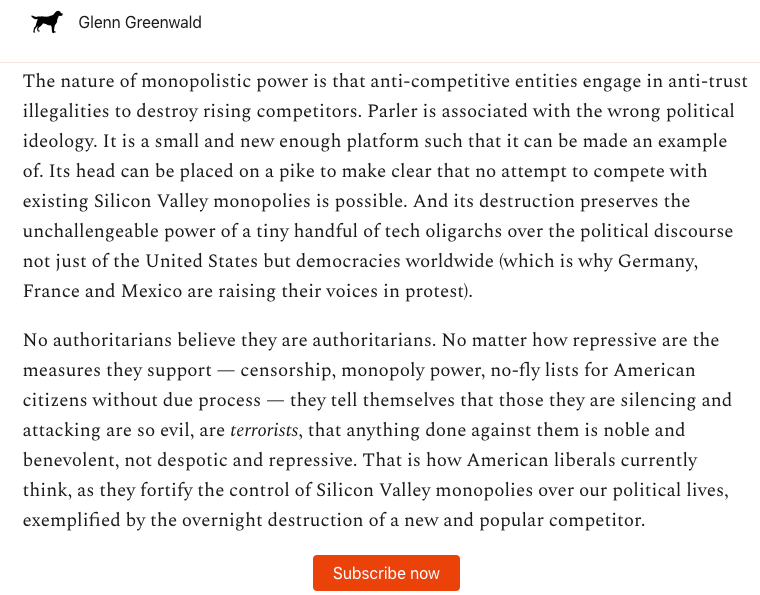
Just three months ago, a Dem-led House Committee issued a major report warning of the dangers of the anti-trust power of Apple, Amazon, Google and Facebook. Left-wing scholars have been sounding the alarm for years. Now it's here, and liberals
In the last three months, tech giants have censored political speech and journalism to manipulate U.S. politics -- banning reporting on the Bidens, removing the President, destroying a new competitor -- while US liberals, with virtual unanimity, have cheered.
The ACLU said the unity of Silicon Valley monopoly power to destroy Parler was deeply troubling. Leaders from Germany, France and Mexico protested. Only US liberals support it, because the dominant strain of US liberalism is not economic socialism but political authoritarianism.
https://t.co/qD9OdwlPbV
Just three months ago, a Dem-led House Committee issued a major report warning of the dangers of the anti-trust power of Apple, Amazon, Google and Facebook. Left-wing scholars have been sounding the alarm for years. Now it's here, and liberals
We wrote a 200 page report on why corporate concentration - including the big tech radicalization engines - worsened under both Democratic and Republican administrations. It has to do with antitrust enforcement, and it's fixable by Biden. https://t.co/K85Kv34t83
— Matt Stoller (@matthewstoller) January 12, 2021

You May Also Like






One of the most successful stock trader with special focus on cash stocks and who has a very creative mind to look out for opportunities in dark times
Covering one of the most unique set ups: Extended moves & Reversal plays
Time for a 🧵 to learn the above from @iManasArora
What qualifies for an extended move?
30-40% move in just 5-6 days is one example of extended move
How Manas used this info to book
Post that the plight of the
Example 2: Booking profits when the stock is extended from 10WMA
10WMA =
Another hack to identify extended move in a stock:
Too many green days!
Read
Covering one of the most unique set ups: Extended moves & Reversal plays
Time for a 🧵 to learn the above from @iManasArora
What qualifies for an extended move?
30-40% move in just 5-6 days is one example of extended move
How Manas used this info to book
The stock exploded & went up as much as 63% from my price.
— Manas Arora (@iManasArora) June 22, 2020
Closed my position entirely today!#BroTip pic.twitter.com/CRbQh3kvMM
Post that the plight of the
What an extended (away from averages) move looks like!!
— Manas Arora (@iManasArora) June 24, 2020
If you don't learn to sell into strength, be ready to give away the majority of your gains.#GLENMARK pic.twitter.com/5DsRTUaGO2
Example 2: Booking profits when the stock is extended from 10WMA
10WMA =
#HIKAL
— Manas Arora (@iManasArora) July 2, 2021
Closed remaining at 560
Reason: It is 40+% from 10wma. Super extended
Total revenue: 11R * 0.25 (size) = 2.75% on portfolio
Trade closed pic.twitter.com/YDDvhz8swT
Another hack to identify extended move in a stock:
Too many green days!
Read
When you see 15 green weeks in a row, that's the end of the move. *Extended*
— Manas Arora (@iManasArora) August 26, 2019
Simple price action analysis.#Seamecltd https://t.co/gR9xzgeb9K


