𝗠𝘂𝗹𝘁𝗶𝗽𝗹𝗲 𝘀𝗲𝗰𝘁𝗼𝗿 𝘄𝗮𝘁𝗰𝗵𝗹𝗶𝘀𝘁 𝗼𝗻 𝗧𝗿𝗮𝗱𝗶𝗻𝗴𝘃𝗶𝗲𝘄 𝘂𝘀𝗶𝗻𝗴 𝘁𝗵𝗲 𝗙𝗥𝗘𝗘 𝘃𝗲𝗿𝘀𝗶𝗼𝗻!
A THREAD 🧵
Please Like and Re-Tweet. It took a lot of effort to put this together.
#StockMarket #TradingView #trading #watchlist #Nifty500 #stockstowatch
I have attached a sample video on how you can add different #watchlist with the mobile app.



More from Tradingview

Tradingview Tricks Hacks and Tutorial
A thread 🔖
Tradingview is one of the most used Trading Websites in the world used by most traders .
Retweet Share !
@kuttrapali26 @AmitabhJha3
#stockstowatch #StockMarketindia
1/n
Trick to Add Unlimited Watchlists in
#Tradingview free Version
Step 1 : Open Trading View Mobile App
Step 2 : Click on " + "
Step 3 : Create Watchlist
This works only on Mobile app
After making Watchlist on Mobile app you can add stocks in Website also .
2/n

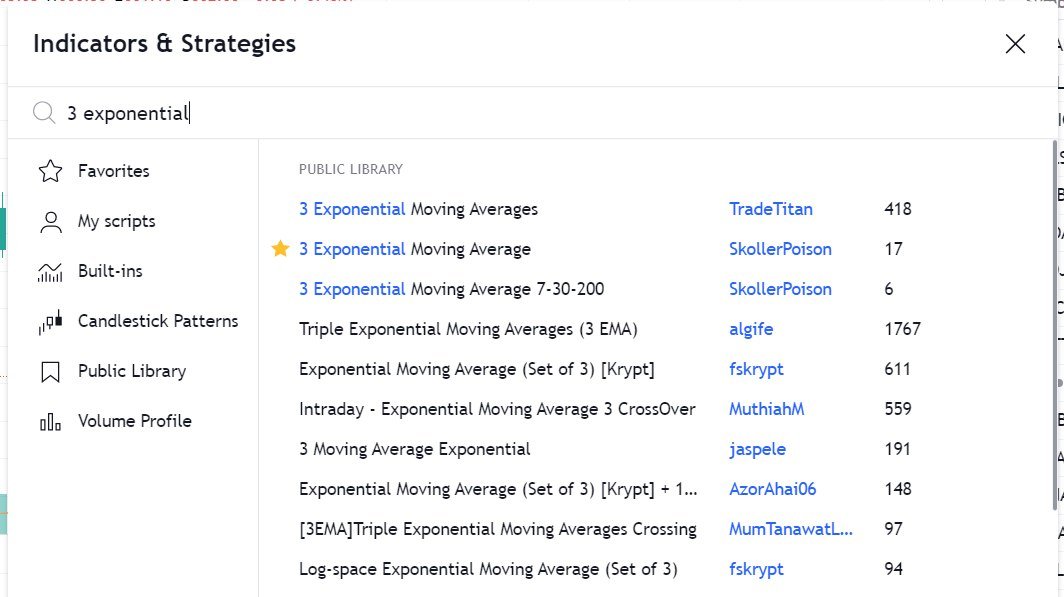
HOW TO APPLY MORE THAN 3 MOVING AVERAGES IN #TradingView Free Version
Step 1 : Just Write "3 expo "
You will get multiple Options
Select "skollerposion"
Step 2 : TO add Normal moving Averages refer the 2nd Picture
Add other indicators as your own
3/n
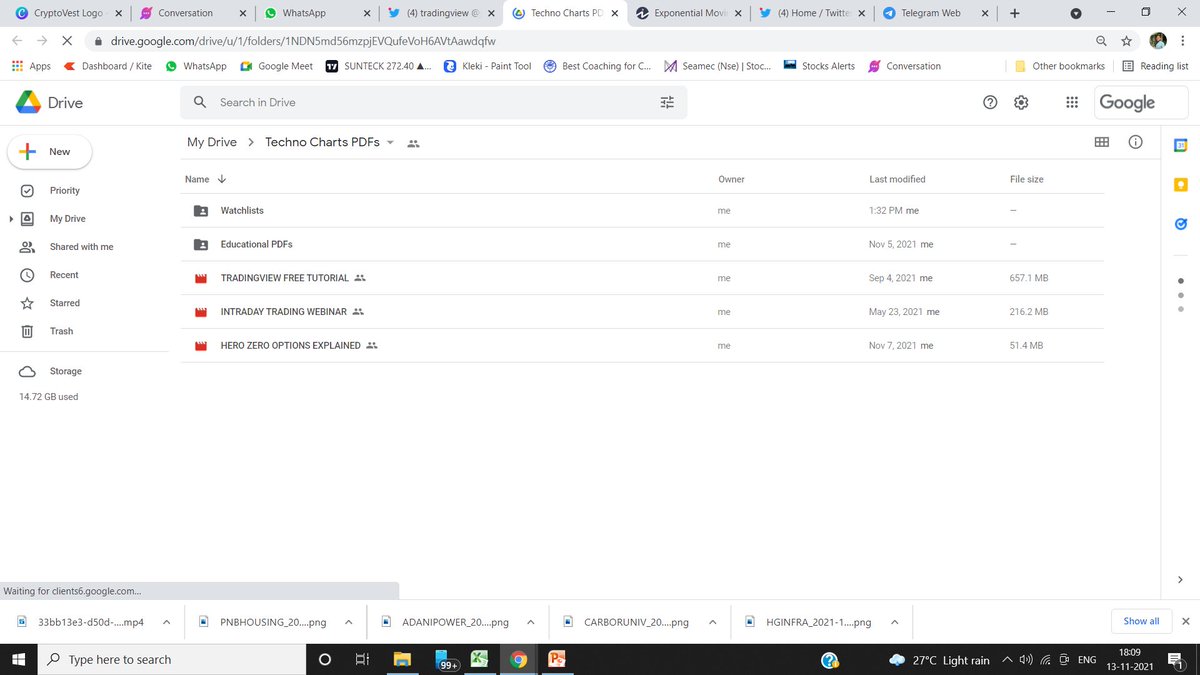
Link for Tradingview Free tutorial :
https://t.co/jx2gJEEC0t
Watchlist of FnO Midcap Largecaps etc shared
Copy watchlist from the folder and paste it through webiste only .
Copy Paste doesnt work in App
4/n
A thread 🔖
Tradingview is one of the most used Trading Websites in the world used by most traders .
Retweet Share !
@kuttrapali26 @AmitabhJha3
#stockstowatch #StockMarketindia
1/n
Trick to Add Unlimited Watchlists in
#Tradingview free Version
Step 1 : Open Trading View Mobile App
Step 2 : Click on " + "
Step 3 : Create Watchlist
This works only on Mobile app
After making Watchlist on Mobile app you can add stocks in Website also .
2/n
HOW TO APPLY MORE THAN 3 MOVING AVERAGES IN #TradingView Free Version
Step 1 : Just Write "3 expo "
You will get multiple Options
Select "skollerposion"
Step 2 : TO add Normal moving Averages refer the 2nd Picture
Add other indicators as your own
3/n
Link for Tradingview Free tutorial :
https://t.co/jx2gJEEC0t
Watchlist of FnO Midcap Largecaps etc shared
Copy watchlist from the folder and paste it through webiste only .
Copy Paste doesnt work in App
4/n
Drive Link for
— JayneshKasliwal (@JayneshKasliwal) November 5, 2021
Custom Made Pdfs on
1. Trading Strategies
2. Stock Selection
3. Tradingview Free Tutorial
4. Psychology https://t.co/9ukwfjLDYT
Retweet Share !@kuttrapali26 @MarketScientist @AmitabhJha3


Trading view scanner process -
1 - open trading view in your browser and select stock scanner in left corner down side .
2 - touch the percentage% gain change ( and u can see higest gainer of today)
3. Then, start with 6% gainer to 20% gainer and look charts of everyone in daily Timeframe . (For fno selection u can choose 1% to 4% )
4. Then manually select the stocks which are going to give all time high BO or 52 high BO or already given.
5. U can also select those stocks which are going to give range breakout or already given range BO
6 . If in 15 min chart📊 any stock sustaing near BO zone or after BO then select it on your watchlist
7 . Now next day if any stock show momentum u can take trade in it with RM
This looks very easy & simple but,
U will amazed to see it's result if you follow proper risk management.
I did 4x my capital by trading in only momentum stocks.
I will keep sharing such learning thread 🧵 for you 🙏💞🙏
Keep learning / keep sharing 🙏
@AdityaTodmal
1 - open trading view in your browser and select stock scanner in left corner down side .
2 - touch the percentage% gain change ( and u can see higest gainer of today)
Making thread \U0001f9f5 on trading view scanner by which you can select intraday and btst stocks .
— Vikrant (@Trading0secrets) October 22, 2021
In just few hours (Without any watchlist)
Some manual efforts u have to put on it.
Soon going to share the process with u whenever it will be ready .
"How's the josh?"guys \U0001f57a\U0001f3b7\U0001f483
3. Then, start with 6% gainer to 20% gainer and look charts of everyone in daily Timeframe . (For fno selection u can choose 1% to 4% )
4. Then manually select the stocks which are going to give all time high BO or 52 high BO or already given.
5. U can also select those stocks which are going to give range breakout or already given range BO
6 . If in 15 min chart📊 any stock sustaing near BO zone or after BO then select it on your watchlist
7 . Now next day if any stock show momentum u can take trade in it with RM
This looks very easy & simple but,
U will amazed to see it's result if you follow proper risk management.
I did 4x my capital by trading in only momentum stocks.
I will keep sharing such learning thread 🧵 for you 🙏💞🙏
Keep learning / keep sharing 🙏
@AdityaTodmal


TradingView isn't just charts
It's much more powerful than you think
9 things TradingView can do, you'll wish you knew yesterday: 🧵
Collaborated with @niki_poojary
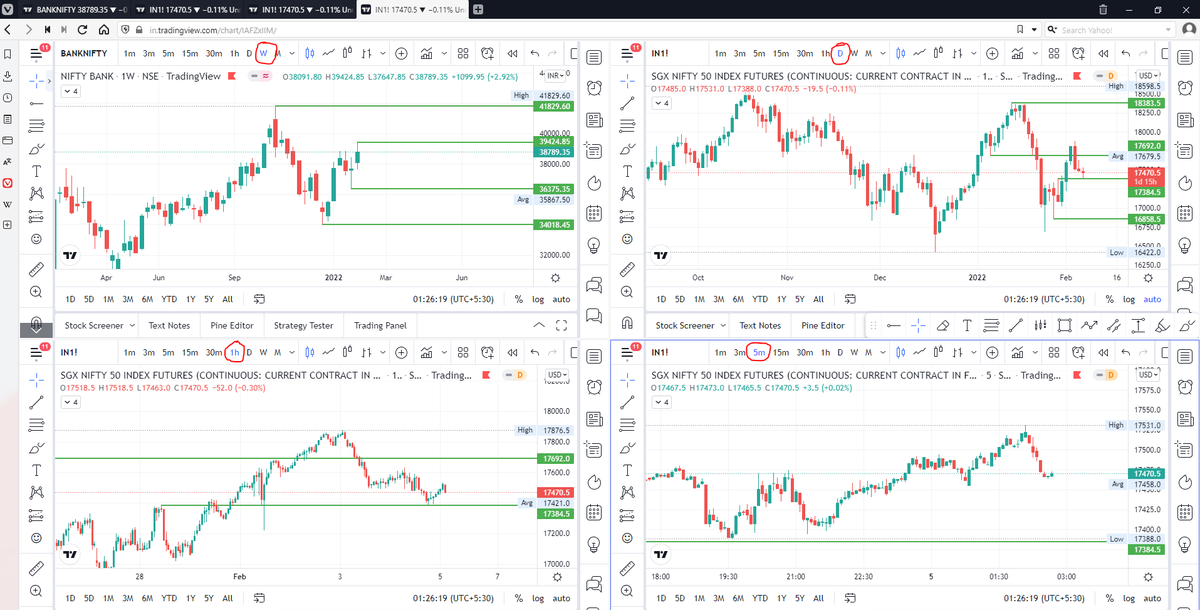
1/ Free Multi Timeframe Analysis
Step 1. Download Vivaldi Browser
Step 2. Login to trading view
Step 3. Open bank nifty chart in 4 separate windows
Step 4. Click on the first tab and shift + click by mouse on the last tab.
Step 5. Select "Tile all 4 tabs"
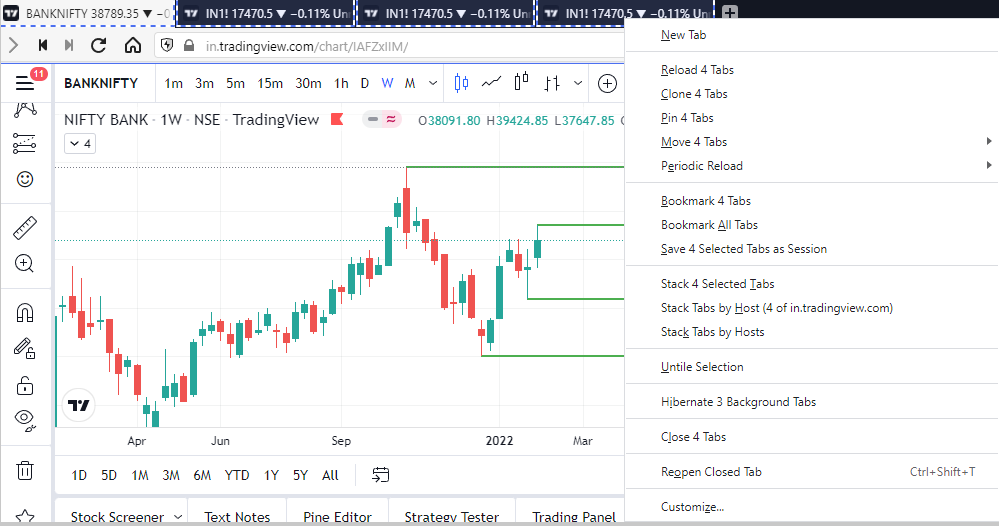
What happens is you get 4 charts joint on one screen.
Refer to the attached picture.
The best part about this is this is absolutely free to do.
Also, do note:
I do not have the paid version of trading view.
2/ Free Multiple Watchlists
Go through this informative thread where @sarosijghosh teaches you how to create multiple free watchlists in the free
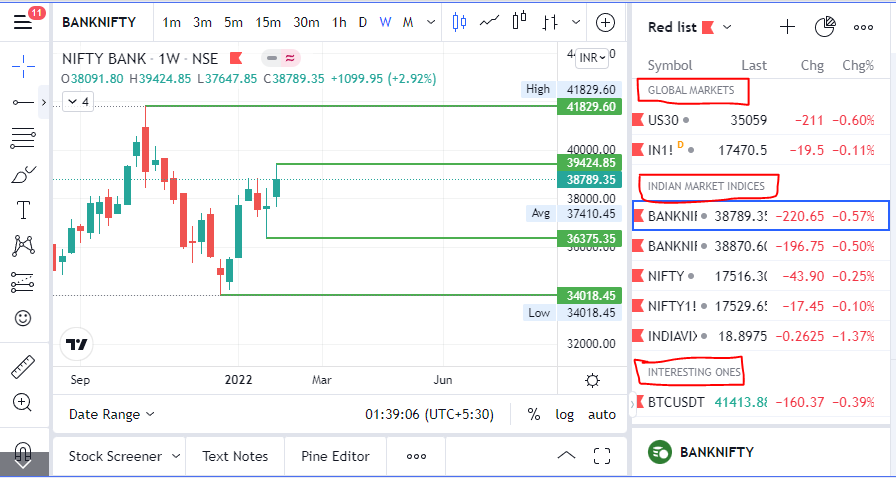
3/ Free Segregation into different headers/sectors
You can create multiple sections sector-wise for free.
1. Long tap on any index/stock and click on "Add section above."
2. Secgregate the stocks/indices based on where they belong.
Kinda like how I did in the picture below.
It's much more powerful than you think
9 things TradingView can do, you'll wish you knew yesterday: 🧵
Collaborated with @niki_poojary
1/ Free Multi Timeframe Analysis
Step 1. Download Vivaldi Browser
Step 2. Login to trading view
Step 3. Open bank nifty chart in 4 separate windows
Step 4. Click on the first tab and shift + click by mouse on the last tab.
Step 5. Select "Tile all 4 tabs"
What happens is you get 4 charts joint on one screen.
Refer to the attached picture.
The best part about this is this is absolutely free to do.
Also, do note:
I do not have the paid version of trading view.
2/ Free Multiple Watchlists
Go through this informative thread where @sarosijghosh teaches you how to create multiple free watchlists in the free
\U0001d5e0\U0001d602\U0001d5f9\U0001d601\U0001d5f6\U0001d5fd\U0001d5f9\U0001d5f2 \U0001d600\U0001d5f2\U0001d5f0\U0001d601\U0001d5fc\U0001d5ff \U0001d604\U0001d5ee\U0001d601\U0001d5f0\U0001d5f5\U0001d5f9\U0001d5f6\U0001d600\U0001d601 \U0001d5fc\U0001d5fb \U0001d5e7\U0001d5ff\U0001d5ee\U0001d5f1\U0001d5f6\U0001d5fb\U0001d5f4\U0001d603\U0001d5f6\U0001d5f2\U0001d604 \U0001d602\U0001d600\U0001d5f6\U0001d5fb\U0001d5f4 \U0001d601\U0001d5f5\U0001d5f2 \U0001d5d9\U0001d5e5\U0001d5d8\U0001d5d8 \U0001d603\U0001d5f2\U0001d5ff\U0001d600\U0001d5f6\U0001d5fc\U0001d5fb!
— Sarosij Ghosh (@sarosijghosh) September 18, 2021
A THREAD \U0001f9f5
Please Like and Re-Tweet. It took a lot of effort to put this together. #StockMarket #TradingView #trading #watchlist #Nifty500 #stockstowatch
3/ Free Segregation into different headers/sectors
You can create multiple sections sector-wise for free.
1. Long tap on any index/stock and click on "Add section above."
2. Secgregate the stocks/indices based on where they belong.
Kinda like how I did in the picture below.